
Enterprise policy management for Microsoft 365
Policies people read.
Proof auditors accept.
Write, approve, publish, acknowledge and evidence every company policy, inside the Microsoft 365 your teams already use. No new portal, no new login.
Same day
From install to your first policy out for acknowledgement.
No new login
Staff sign in with the Microsoft account they already use.
Zero copies
Documents stay in SharePoint; Upholdly keeps only the records.
130+ languages
Optional AI summaries in each reader’s own language.
Works inside the Microsoft 365 apps your people already use



The problem
Policy compliance still runs on email, spreadsheets and hope.
Scattered
Policies spread across sites, drives and intranets. Which version is current?
Unread
Sign-offs chased by email. HR can’t say who has read the handbook.
Unprovable
Audit week means screenshots and spreadsheets to prove who read what.
When the auditor asks “who read it?”, “we think everyone” isn’t an answer.
How it works
One lifecycle for every policy, inside Microsoft 365.
- 01
Author
Write in Word and SharePoint, just as you do today. Nothing is moved.
- 02
Approve
Reviewers sign off electronically before anything goes live.
- 03
Publish
Assign to the Entra groups it applies to, with a due date.
- 04
Acknowledge
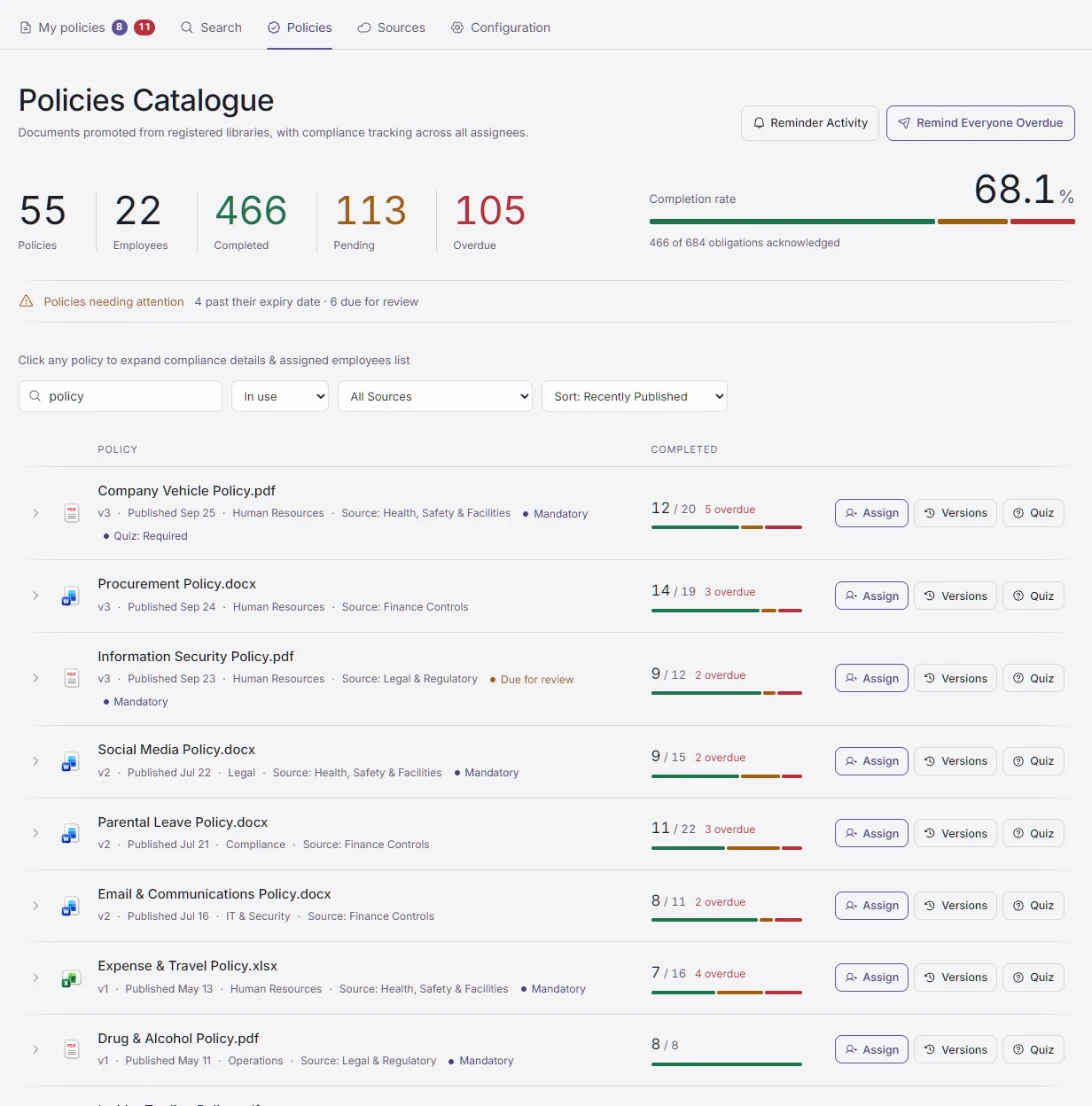
Employees read, pass a quiz if you require one, and attest in Teams; reminders do the chasing.
- 05
Prove
Every step lands in an audit trail you can hand to an auditor.
Why teams choose Upholdly
Built for proof, not just storage.
Proof per person
Every acknowledgement is recorded against the exact version each person read.
Quizzes that prove understanding
AI drafts the questions, you approve them, and you can require a pass before anyone acknowledges. How quizzes work
Reminders in Teams
Due-soon and overdue reminders arrive in the Teams activity feed, not another email.
A full audit trail
Approvals, publishing, assignments, reminders, quiz attempts and acknowledgements, all recorded.
The right people
Assign by Entra group, so new joiners automatically get the policies that apply to them.
Optional AI
Ask questions, get summaries and listen to policies, on your own Azure AI resource.
Why now
Auditors want evidence, not intent.
Frameworks increasingly expect you to show that a policy was approved, reached the right people and was read.
| Framework | What it expects | How Upholdly supports the evidence |
|---|---|---|
| ISO/IEC 27001:2022 | Policies approved, communicated and acknowledged by staff (Annex A 5.1) | Approval workflow, targeted publishing, attestation |
| SOC 2 | Policies and responsibilities communicated internally (CC2.2) | Read tracking for every assignee |
| GDPR | Be able to demonstrate compliance (Art. 5(2)) | Timestamped evidence per person |
| NIS2 | Management accountability and cyber-hygiene training (Art. 20–21) | Review cycles, reminders, quizzes |
| DORA | ICT security awareness for all staff (Art. 13) | Organisation-wide campaigns, with proof |
A summary for orientation, not legal advice. Upholdly produces evidence; it does not certify compliance.
Good to know
Questions buyers ask first.
Not sure where you stand today? Take the two-minute evidence check, or work out what chasing costs you with the savings calculator.
Do employees need another account or app?
No. They use Upholdly inside Microsoft Teams and Outlook with the Microsoft account they already have, through Entra single sign-on.
Do our policy documents leave SharePoint?
No. Upholdly reads them in place through Microsoft Graph and never stores copies. It keeps only the records: who was assigned what, who acknowledged, and when.
How long does it take to set up?
Most teams go live the same day: install the app, approve its permissions, point it at your SharePoint libraries and publish your first policy.
Can we check people understood a policy?
Yes. Add a quiz to any policy, drafted by AI and reviewed by you, and require a pass before anyone can acknowledge.
Do we have to use AI?
No. AI is optional and off by default. If you turn it on, it runs on your own Azure AI resource.
Bring one policy. Leave with proof.
A 30-minute demo with one of your own policies. Then a same-day pilot with one department.